 Add us as a preferred source on Google
Search for your restaurant on Google as if you have never stayed at the hotel. You may find an incomplete profile, a hotel homepage with little mention of dining, or no obvious way to book a table.
That gap does not necessarily reflect the quality of the food or the service. It may simply mean the restaurant is difficult to discover, difficult to understand, or difficult to reserve for someone who has no reason to know the hotel already.
Hotel restaurant managers face an extra layer of difficulty here. The Google Business Profile may sit with corporate marketing. The website may be controlled by a brand team. The booking system may have been chosen for hotel rooms rather than restaurant reservations. You can see the commercial gap clearly without having the access needed to fix it.
This guide works through a practical sequence: make the restaurant discoverable, give local diners enough information to choose it, make the booking process quick and direct, and measure whether that activity produces reservations and covers.
Step 1: Search for your restaurant as a local diner would
Open Google and search for the restaurant by name. Then search for the type of food you serve, combined with phrases such as “restaurants near me” or “restaurants in [area].”
Check the results in Google Maps and the Local Pack. Look at the name shown for the restaurant, opening hours and special hours, the address and phone number, the primary category, menu access and price information, food and venue photography, reviews and recent responses, parking and entrance details, and the visibility of any booking button.
Repeat the exercise on a mobile phone. The experience often differs from the desktop version, and mobile is where a local diner will make a quick decision between three options.
A listing can be technically present and still fail to persuade. If someone sees a hotel exterior shot, an outdated menu and no clear booking route, they have little evidence that the restaurant suits their occasion. A profile view has commercial value only when it moves someone towards the next step.
Step 2: Decide whether the restaurant needs its own search identity
The right structure depends on how the restaurant operates and how it is presented to the market.
A dedicated Google Business Profile and restaurant page may be suitable when the restaurant has its own name, a distinct dining concept, a separate entrance or visible street presence, and a proposition genuinely aimed at local diners. If people have a reason to search for it independently of the hotel, it should be independently findable.
A separate listing can create confusion when the restaurant exists only as a generic hotel facility, has no distinct public identity, or shares the same entrance and information as the hotel. In that situation, strengthening the restaurant section of the hotel’s profile and website is more productive than creating a duplicate presence.
The hotel connection should remain clear either way. Local diners need to know where they are going and what the setting is. The restaurant also needs enough space to communicate its cuisine, atmosphere, menus and service periods without being buried beneath room information. This is where a broader hotel restaurant marketing strategy can shape the restaurant’s position before digital channels are changed.
If you do not control the relevant digital assets, record the problem rather than letting it remain a vague concern. Capture the current profile state, note who owns access, and list the changes required. A short, specific request to ownership or corporate marketing is far easier to act on than a general complaint about visibility.
Step 3: Claim and complete the Google Business Profile
Google Business Profile is usually the first local visibility asset to address for restaurant searches. It supplies much of the information people see in Google Maps and local search results.
Start by confirming ownership and access. If the profile belongs to a former agency, a hotel marketing team, or an individual who has left the business, request manager access through the appropriate Google process. The restaurant team does not always need primary ownership, but it does need a reliable route for correcting hours, menus, photos and booking information.
Get the core information right
Check these fields carefully: the exact restaurant or hotel name, correct address and phone number, regular opening hours, special and holiday hours, the most specific appropriate primary category, relevant secondary categories, dietary and ambience attributes, parking and access information, and a description that names the cuisine, area and dining proposition.
Category choice affects how Google understands the business. “Italian Restaurant” communicates more to both Google and searchers than the broad label “Restaurant,” provided it accurately reflects the operation
The description should sound like the restaurant. Explain what people can eat, where the venue is and who it suits. Avoid turning the copy into a room-sales paragraph with a dining sentence added at the end. I have seen profiles where the restaurant description reads like it was written by the reservations desk for a travel agent. That is a missed opportunity every day the profile stays live.
These details reduce uncertainty for the diner deciding between several venues. They want to know whether the restaurant is open tonight, whether the menu suits the group, and whether arriving at the hotel will be straightforward. Every unanswered question is a reason to choose somewhere else.
Step 4: Add the information that turns a profile view into genuine interest
The profile should help someone picture the experience before they commit to a booking.
Add the current menu, with prices or a clear price range where appropriate. An HTML menu is easier to inspect than a PDF alone, especially on mobile. Make dietary information easy to find rather than requiring a diner to search through several pages or call the hotel.
Use photography that shows the actual dining proposition: representative dishes, the dining room in service, the bar or terrace if relevant, the entrance and route from the street, and the atmosphere at the times you most want to sell. Generic hotel lobby images do little to help someone choose a restaurant for dinner, brunch, or a business meal.
Keep hotel guests in mind as well. A clear menu and practical arrival information help someone staying in the property, while the restaurant identity and local context help someone who lives nearby. The same profile can serve both audiences when the information is organized around dining rather than accommodation.
Step 5: Create a restaurant page that can rank and convert
A hotel homepage rarely gives the restaurant enough room to compete with standalone venues in local search results. Create a clear restaurant page within the hotel site, or a dedicated website where the name, concept and brand architecture support it.
The page should include: the restaurant name and clear dining proposition, cuisine and location, opening hours and service periods, menu access in HTML where possible, dietary and accessibility information, parking and entrance context, strong food and venue photography, a prominent “Book a table” button, links to relevant events or seasonal offers, and restaurant-specific contact details.
Use natural references to the neighborhood, city and cuisine type. A page that repeats the same phrase in every heading will read poorly and give diners no additional information. The page also needs to reflect the restaurant’s price point and positioning. A fine-dining venue, a casual all-day restaurant and a hotel bar should not use identical language or target the same search intent.
A strong page cannot compensate for an incomplete Google Business Profile, and a complete profile cannot compensate for a weak page. Search visibility works as a connected system: the profile earns attention, the page builds confidence, and the booking route converts that interest into a confirmed cover.
Step 6: Make direct reservations the clear next step from search
A local diner should reach the table-booking flow directly from the profile whenever possible. Sending someone to the hotel homepage creates an unnecessary step. Sending them to a slow booking engine or a generic third-party listing creates more opportunities for abandonment.
Check that the reservation link goes directly to the restaurant booking page, works properly on mobile, shows available dates and times quickly, provides instant confirmation where the system supports it, matches the opening hours shown elsewhere, and keeps menu information and booking availability aligned.
Some booking systems support “Reserve with Google.” Others do not, particularly where the hotel uses a less common platform or a system designed around property management rather than restaurant service. If native integration is unavailable, use a clear restaurant booking landing page as the fallback.
Third-party reservation platforms can help with reach, but they should sit within a deliberate channel strategy. Consider commission, customer ownership and brand control. A direct booking route from Google and the restaurant website gives you a clearer connection between search activity and covers.
Step 7: Build local relevance beyond Google Business Profile
Review the restaurant’s name, address and phone number across the hotel website, local directories, tourism listings, event pages, and relevant hospitality platforms. Inconsistent information can create confusion for diners and weaken the credibility of the listing.
This does not mean submitting the restaurant to every directory available. Focus on places that local diners or visitors might reasonably use, and keep the information consistent across those sources.
Build useful pages around real services and occasions: brunch, set menus, seasonal dining events, pre-theatre or post-work dining where appropriate, private dining and celebrations, and distinct lunch or dinner service periods. Each page should reflect what the restaurant actually offers. A hotel restaurant should also explain practical access, including the hotel setting, entrance and parking, where that information helps someone commit to a visit. Local relevance comes from useful detail, not from adding a town name to every sentence.
Step 8: Use reviews, photos and Google posts as ongoing maintenance
Local visibility requires regular attention after the initial setup. Create a manageable monthly routine covering these activities: requesting restaurant-specific reviews from diners, responding to reviews with relevant and human replies, uploading current dish and room photography, publishing posts about menus, events and time-sensitive offers, removing outdated information, and checking holiday and special hours.
Hotel restaurants often receive feedback mixed into the wider hotel reputation. Encourage diners to mention the restaurant when they leave a review, without scripting what they should say. This helps the profile develop a clearer dining identity over time.
Use Google posts for information that changes. A tasting event, seasonal menu, or brunch service gives a local searcher a reason to investigate now. Generic hotel promotions are less useful when the goal is to attract someone looking for a place to eat.
Step 9: Measure the route from visibility to covers
Rankings can help diagnose a problem, but they are not the commercial outcome. Set up a monthly review using the measures you can access: Google Business Profile views, calls and direction requests, menu views, website visits from Google, reservation link clicks, completed reservations, covers attributed to Google or organic search, and no-show or cancellation patterns where available.
Add UTM parameters to the website link from your Google Business Profile so GA4 or your analytics system can identify traffic from the profile. Track reservation actions where the booking platform allows it.
A simple review should answer three questions at each stage of the funnel:
| Stage | What to inspect | What breaks if this is missing | |
|---|---|---|---|
| Discoverable | Profile completeness, categories, hours, Maps presence, local listings | Local diners never reach the restaurant | |
| Convincing | Menu, pricing cues, photos, reviews, practical details | Searchers compare the venue and choose another | |
| Bookable | Direct link, mobile flow, availability display, confirmation | Interest does not convert into a cover |
Add a fourth dimension to each row: is this something the restaurant team can fix directly, something that requires access from another department, or something that needs approval from ownership or corporate marketing?
This turns a general request for “better SEO” into a practical business case. Show the current gap, the specific change required, and the movement in profile views, menu visits, booking clicks, or confirmed reservations after the change is made.
Putting this into a 30-day operating plan
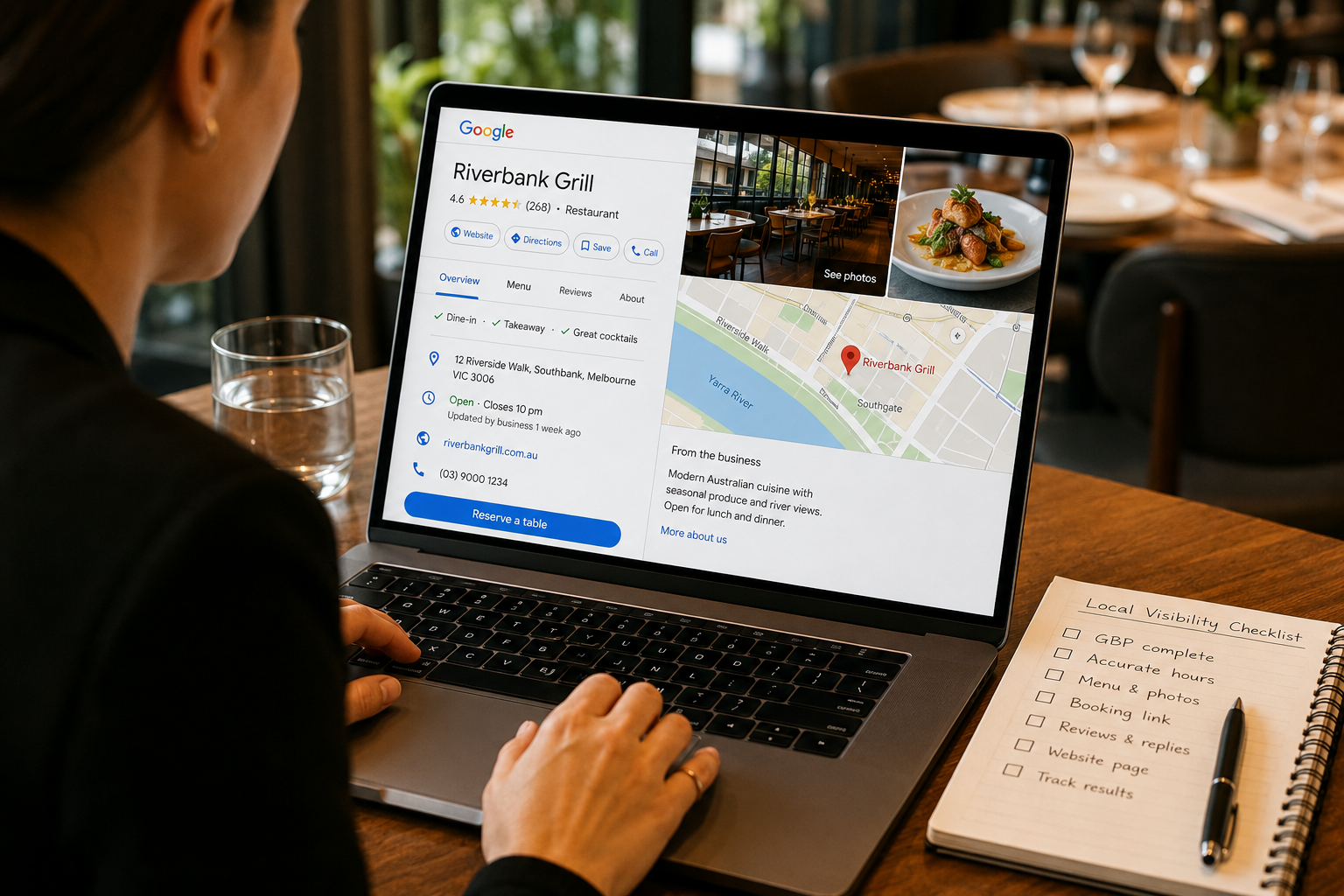
Week 1: Search Google and Maps as a local diner. Audit access, profile completeness, opening hours, menu information, photography and booking links. Document everything, including who controls each asset.
Week 2: Correct the core profile information, categories, menu details and reservation routing. Submit access or approval requests for anything outside your control.
Week 3: Improve the restaurant page with practical information, current photography and a clear mobile booking experience.
Week 4: Start a review request routine, publish your first relevant Google posts, and establish the monthly measurement report.
This sequence gives the team a workable starting point. It does not promise immediate ranking changes. Reviews, seasonal updates, technical checks and accurate information need continued attention month after month.
Frequently asked questions
How do I attract local diners to my hotel restaurant?
Start by checking how the restaurant appears in Google Maps for its name, cuisine and location. Improve the Google Business Profile, create a clear restaurant page, show the current menu, and make the direct booking path easy to use. Then measure profile activity, booking clicks and covers rather than relying on rankings alone.
How do hotel restaurants attract non-hotel guests?
They need to present the restaurant as a credible local dining option while making the hotel setting easy to understand. Use a distinct restaurant page or profile where the concept supports it, show useful menus and photos, include access information, and connect local search traffic to a direct reservation route.
How do I get my restaurant to show up on Google?
Claim and verify the Google Business Profile, choose an accurate and specific category, maintain correct hours and address details, add the menu and photos, and build consistent listings on relevant local websites. Visibility develops over time through accurate information, reviews, useful updates and a page that matches local search intent.
How do I optimize a Google Business Profile for a restaurant?
Complete the core details first, then add the most specific category, relevant attributes, menu information, price cues, current photography and a direct reservation link. Keep the profile updated with reviews, posts and special hours. The information should describe the restaurant clearly, not rely on generic hotel copy.
Why is my hotel restaurant not showing on Google Maps?
The profile may be unclaimed, incomplete, incorrectly categorized, or competing with a duplicate listing. The restaurant may also lack a distinct identity, relevant local information, or current reviews. Check whether the issue is discoverability, the strength of the restaurant proposition, or the booking path before requesting more marketing activity.
How can I get more direct restaurant bookings?
Send Google and website visitors directly to the restaurant reservation flow. Make the mobile journey quick, show availability clearly, provide confirmation, and keep the menu and opening hours accurate. Track reservation link clicks and completed bookings so you can see which changes produce actual commercial activity.
The objective is a restaurant that local diners can find, understand and book. If the digital assets sit with corporate marketing, the booking system is difficult to change, or the workload is already beyond what the restaurant team can absorb, a connected program can make the work easier to manage.
HospitalityPlate coordinates the restaurant website, booking integration, Google Business Profile, SEO and reporting for hotel restaurants, with ongoing management available where the team needs continued support. If you are looking at the gaps described here and want help closing them, book a call to identify what is practical to fix first at your property.
8 comments